Case study · AWS-native AI system
Coastal Properties
An inherited property-management demo, rebuilt into a tested AI system on AWS
The project came to me as a demo that looked finished but was not. The interface was generated with v0, and the chat ran on another person's automation workflow. I rebuilt it in 11 steps into a system I own end to end. This page walks through each step, including the parts that are still open.
- Role
- Sole engineer: design, build, testing and deployment
- Type
- Demo and reference system, running on sample data
- AI stack
- FastAPI, LangChain and LangGraph on Amazon Bedrock
- Infrastructure
- Serverless on AWS, defined in Terraform, in three environments
- Testing
- Automated tests at every step, plus an end-to-end check after each deploy
- Status
- Development runs the latest version; staging and production are one release behind
What I inherited, and what it became
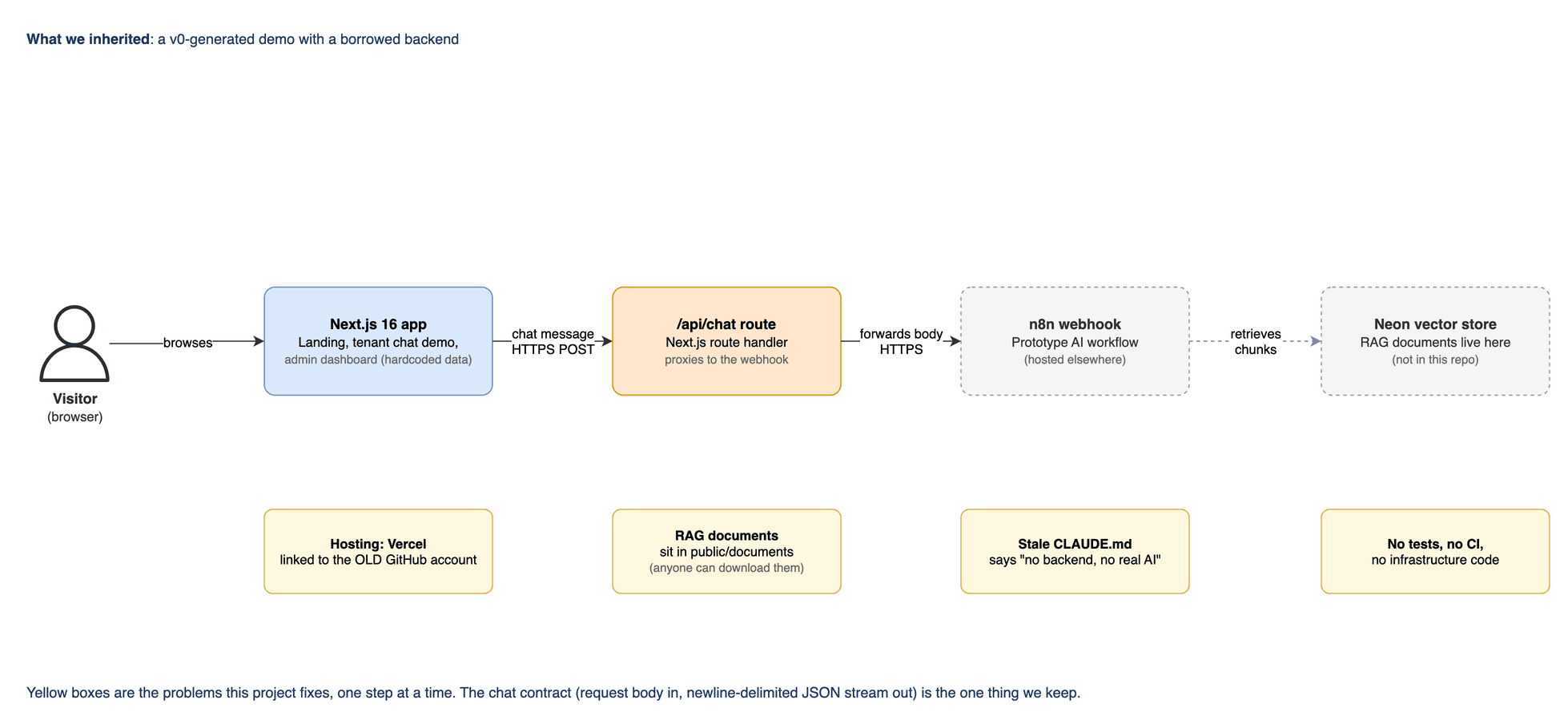
The project arrived looking finished. It had a polished Next.js interface and a chat widget, but the chat was answered by someone else's n8n workflow and an outside vector store. Nothing was tested and nothing was deployed by code: there were no tests, no CI and no infrastructure definitions. Anyone could download the sample documents, and the project's own docs said the app had no backend.
I rebuilt it in 11 steps as a serverless system on AWS. A FastAPI service runs LangChain and LangGraph on Amazon Bedrock. Step Functions loads documents into S3 Vectors. Users sign in with Cognito, CloudFront serves the site, and the whole system is defined in Terraform across three environments, with CI/CD and monitoring. It is a demo and reference system on sample data, not a client's production system. The last two steps, the triage agent and tracing, run in the development environment only so far.

The build, step by step
Each step was planned, built and checked before the next one started. A note under a step's number means part of that step is still open.
Step 00: Orientation and guardrails
Before changing anything, I audited what I had inherited and made it impossible to run a command against the wrong AWS account.
- Audited the inherited repository: a Next.js 16 interface, a chat route that forwarded every message to an n8n webhook, sample documents served publicly, and no tests, CI or infrastructure code
- Wrote a safety check that asks AWS which account the current credentials belong to and stops unless it is the sandbox account
- Put every task behind one Makefile, so the safety check always runs first
- Corrected the project docs, which said the app had no backend
Select the diagram to open it at full size How it was validated
- Ran the check with the sandbox credentials, where it passed, and with another account's credentials, where it stopped
- Confirmed it also catches credentials set as environment variables, which quietly take priority over a named profile
Bash · AWS STS · Make · Next.js
Step 01: Terraform bootstrap and state
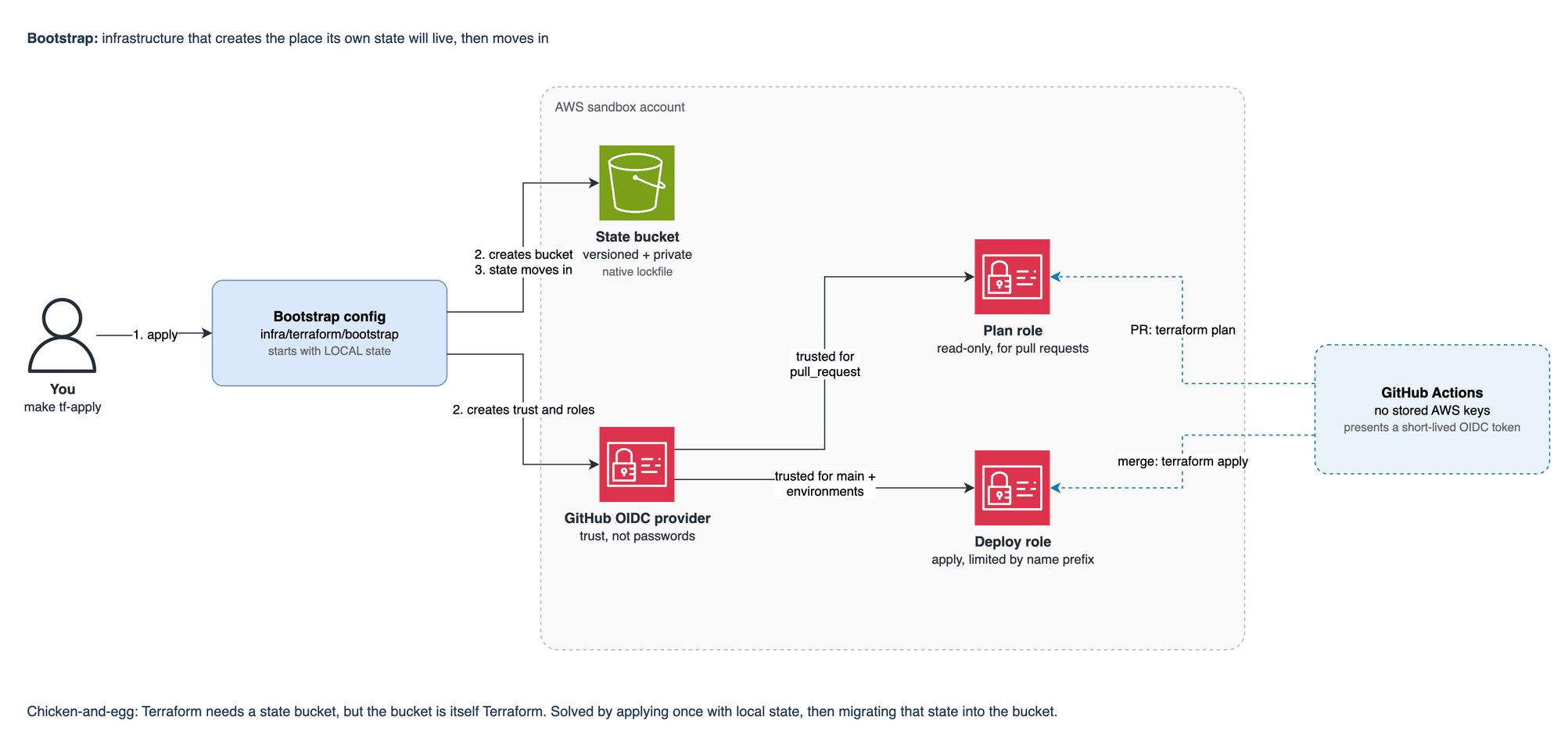
Terraform keeps a record of everything it manages, called state, and that record needs a safe home. The home is itself infrastructure, so I created it first with the state on my machine and then moved the state into it.
- Created a private, encrypted, versioned S3 bucket for the state, with locking and protection against accidental deletion
- Connected GitHub to AWS with OIDC, so CI deploys with short-lived credentials and no AWS keys are stored anywhere
- Gave CI two roles: a read-only one that pull requests use to preview changes, and a deploy one limited to the main branch and named environments
Select the diagram to open it at full size How it was validated
- Applied the bootstrap, moved the state into S3, then planned again against the remote state and got no changes
- Checked in AWS that the read-only role trusts only pull requests from this repository
- Pointed Terraform at the wrong account id on purpose and confirmed it refused to plan
Terraform · Amazon S3 · AWS IAM · GitHub OIDC
Step 02: The API service
I replaced the n8n workflow, which I could not see inside or test, with a Python service I own. It behaves the same in offline tests as it does against Amazon Bedrock.
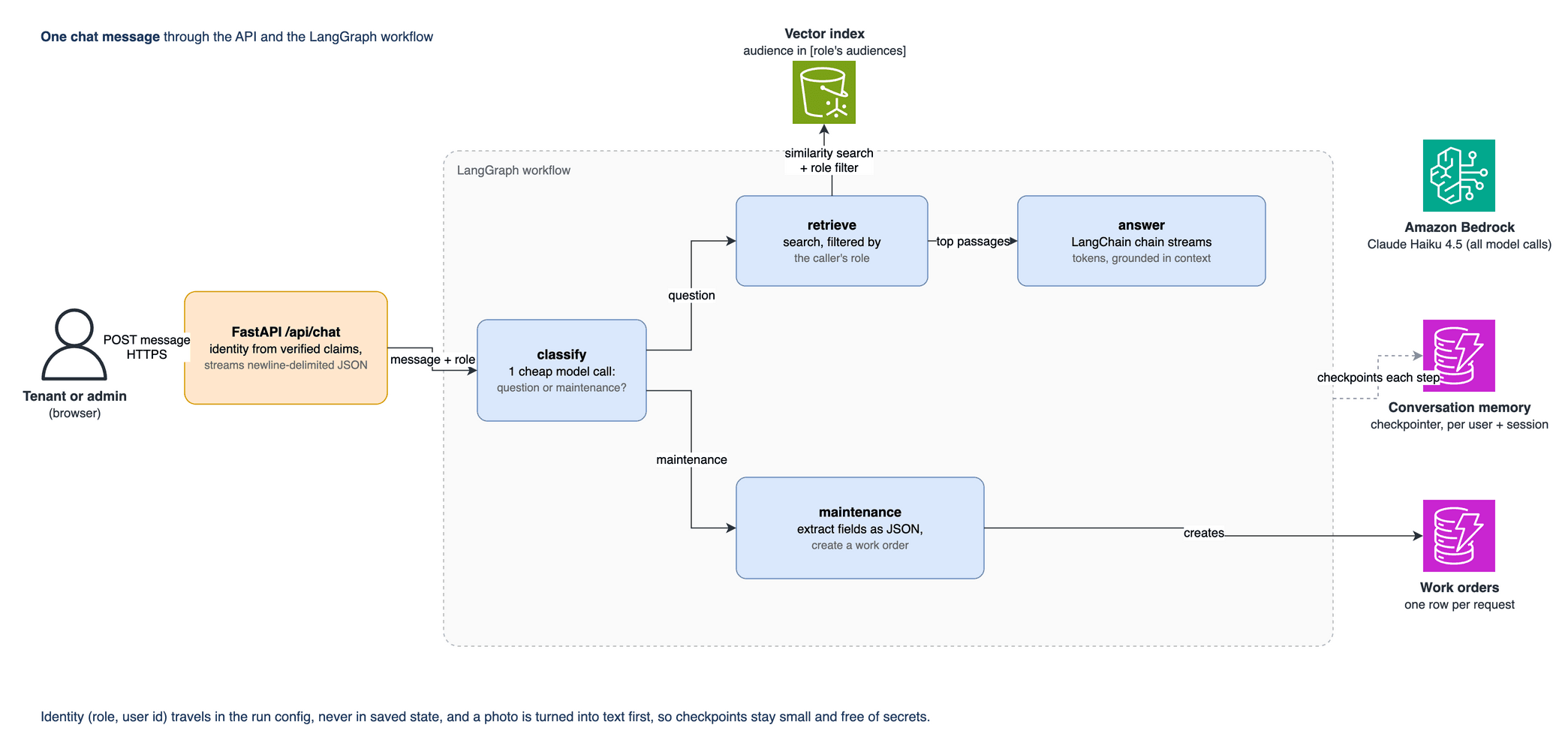
- Built a FastAPI service that streams replies in the same format as before, so the chat widget needed almost no changes
- Wrote a LangGraph workflow: one low-cost model call classifies the message, then the service either answers from retrieved documents or takes a maintenance request and creates a work order
- Enforced access control in the search itself, so results are limited to the documents the caller's role may read
- Added a stand-in model for tests, so the real prompts, parsing and routing run offline at no cost
Select the diagram to open it at full size How it was validated
- Covered the service with unit and API tests, with linting and strict type checking passing
- Removed each safeguard on purpose to confirm the tests catch it: taking out session separation or the role filter made tests fail
- Ran live tests against Amazon Bedrock, including one that confirms a tenant cannot retrieve admin-only data
Python · FastAPI · LangChain · LangGraph · Amazon Bedrock · Amazon DynamoDB
Step 03: Ingestion pipeline
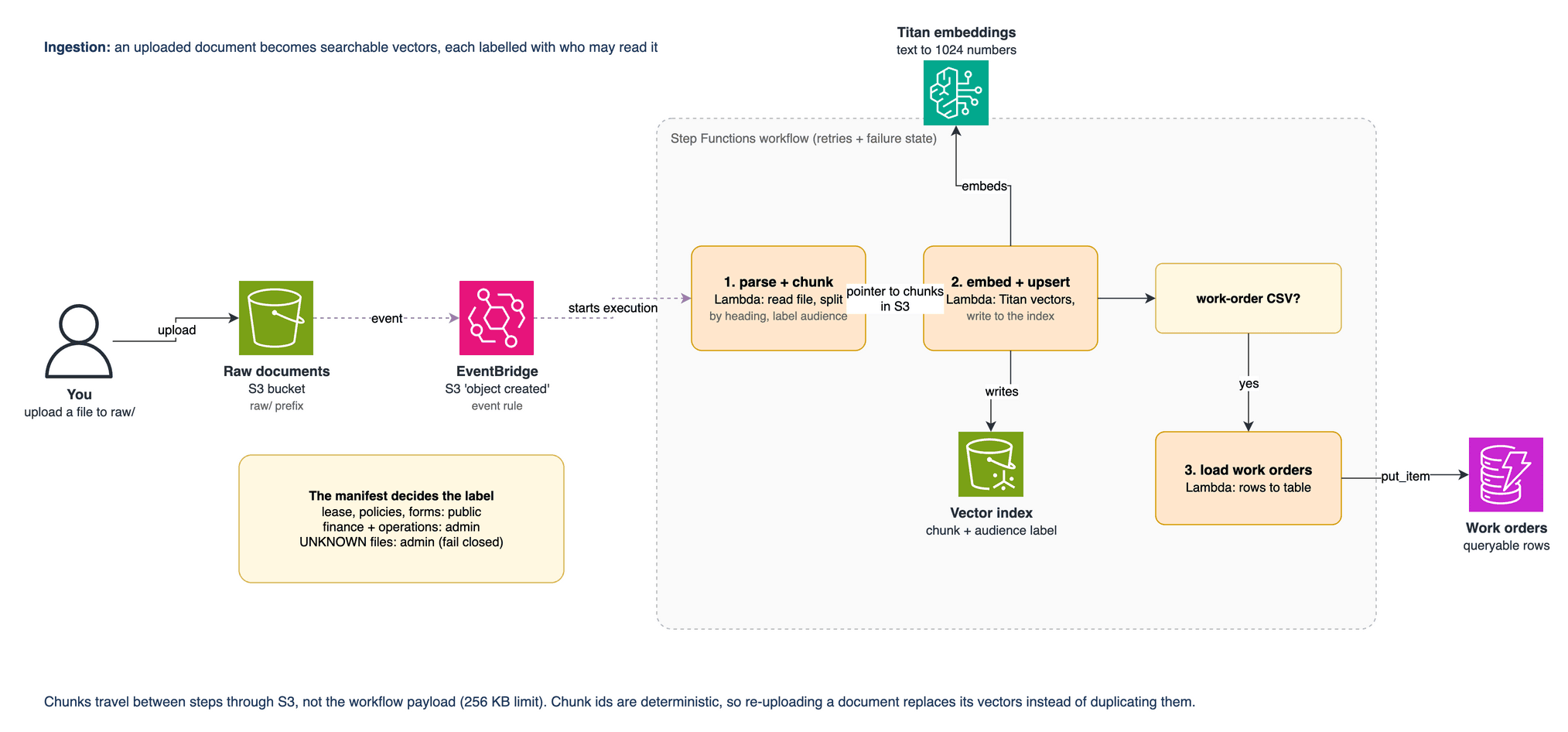
Documents have to be turned into searchable vectors, each labelled with who may read it. Anything without a label is treated as admin-only.
- Moved the sample documents out of the public web folder and wrote parsers for Markdown, Word and CSV files
- Labelled every chunk of text with its audience from a manifest file; a file missing from the manifest defaults to admin-only
- Gave each chunk a stable id, so uploading a document again replaces its vectors instead of duplicating them
- Defined the pipeline as a Step Functions workflow with retries and a failure path, passing chunks through S3 to stay under the payload limit
Select the diagram to open it at full size How it was validated
- Tested offline by running the real workflow definition against the real handlers in a small simulator
- Ingested 70 chunks from 8 files, and got the same 70 on a second run
- Ran live tests against S3 Vectors and Titan embeddings: a tenant asking for admin-only data got back only public chunks
AWS Step Functions · AWS Lambda · Amazon S3 Vectors · Amazon Titan Embeddings · Amazon EventBridge
Step 04: Infrastructure in three environments
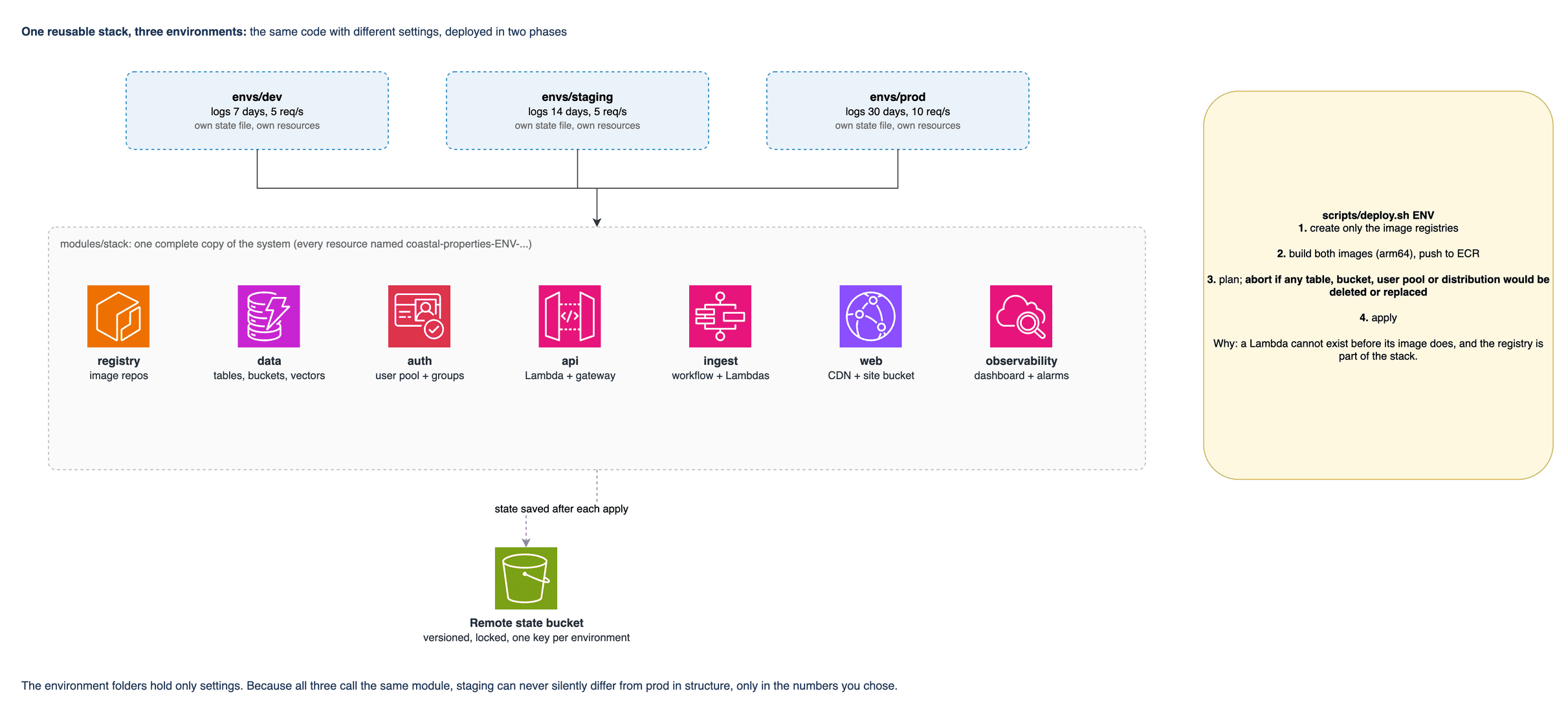
I defined the system once as a reusable Terraform stack and created it three times, for dev, staging and prod, so the environments cannot drift apart in structure.
- Wrote seven Terraform modules and one stack that combines them, about 70 resources per environment
- Ran FastAPI as a container on AWS Lambda behind API Gateway, using the Lambda Web Adapter so replies stream to the browser as they are generated
- Wrote a deploy script that reads the Terraform plan and stops if it would delete or replace a table, bucket, user pool, distribution or registry
- Kept everything serverless, with no VPC, NAT gateway, load balancer or reserved capacity, so nothing is billed while the system sits idle
Select the diagram to open it at full size How it was validated
- Passed the end-to-end smoke test on dev, staging and prod
- Measured a streamed reply through CloudFront, API Gateway and Lambda: about 22 events over about 2 seconds
- The smoke test caught a real fault: an ingestion script had silently not run on staging and prod
Terraform · AWS Lambda · Amazon API Gateway · Amazon DynamoDB · Amazon ECR · Docker
Step 05: Frontend and auth
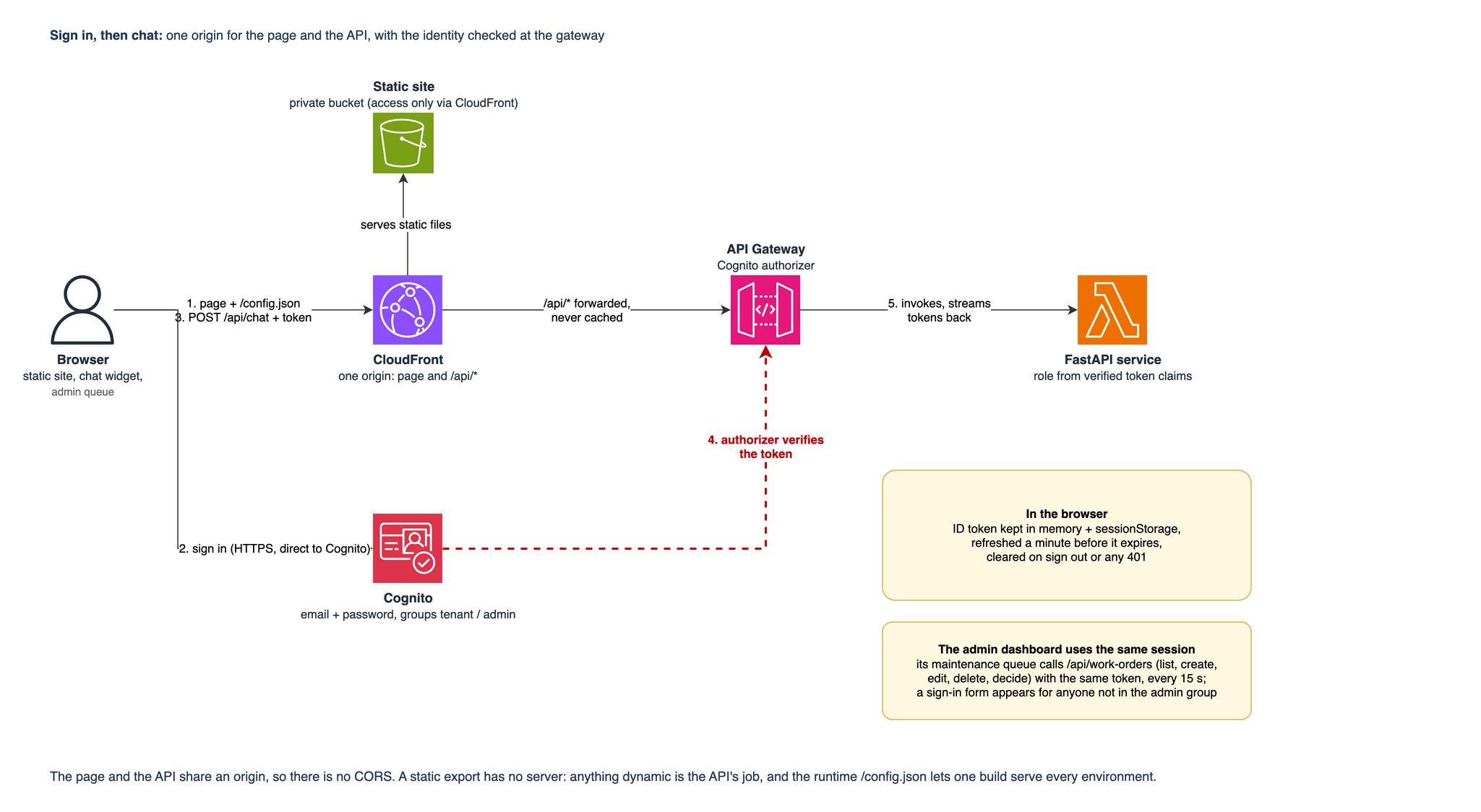
The website and the API are served from one address, and every API call has to carry a verified sign-in token.
- Converted the Next.js app to static files in a private S3 bucket behind CloudFront, which also routes API paths to API Gateway
- Added Cognito sign-in inside the chat widget with two plain HTTPS calls and no SDK; tokens refresh on their own, and any 401 or 403 signs the user out
- Moved the code that reads the reply stream into small pure functions that cope with split lines, garbled lines and a missing final newline
- Loaded the region and client id from a config file at runtime, so one build works in every environment
Select the diagram to open it at full size How it was validated
- Tested the stream reader and the sign-in logic
- Confirmed on the deployed site that the API returns 401 without a token, and that tenant and admin tokens map to the right roles
- Found and removed a leftover analytics script that failed on every page load, which only a real browser showed; a full click-through of the sign-in form remains a manual check
Next.js · React · TypeScript · Amazon Cognito · Amazon CloudFront · Amazon S3
Staging and prod deploy by manual run
Step 06: CI/CD
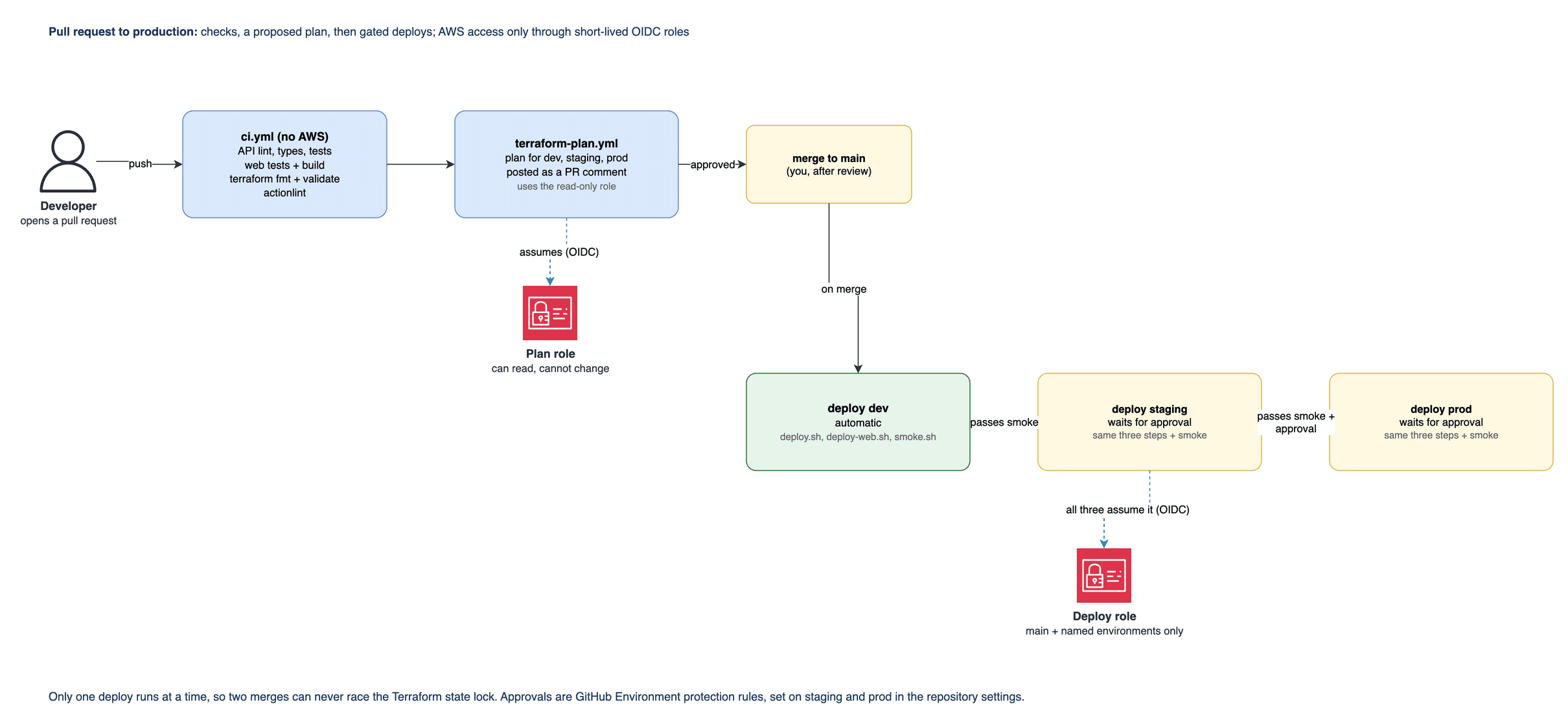
I moved deploys off my laptop. Every pull request gets automated checks and a Terraform plan anyone can read, and deploys run through GitHub with no stored cloud keys.
- Wrote four GitHub Actions workflows: CI checks, a Terraform plan for each environment posted as a pull request comment, a deploy workflow, and the per-environment deploy it calls
- Used the same deploy and smoke-test scripts in the pipeline that I run by hand, so the two cannot drift apart
- Ran the smoke test after every deploy, and queued deploys so two merges cannot run at the same time
Select the diagram to open it at full size How it was validated
- Linted all four workflows with actionlint, with no findings
- Deployed dev from the main branch through the pipeline using GitHub OIDC
- Added permissions the deploy role was missing, which the first pipeline deploys exposed
GitHub Actions · GitHub OIDC · Terraform · actionlint
Step 07: Observability and cost
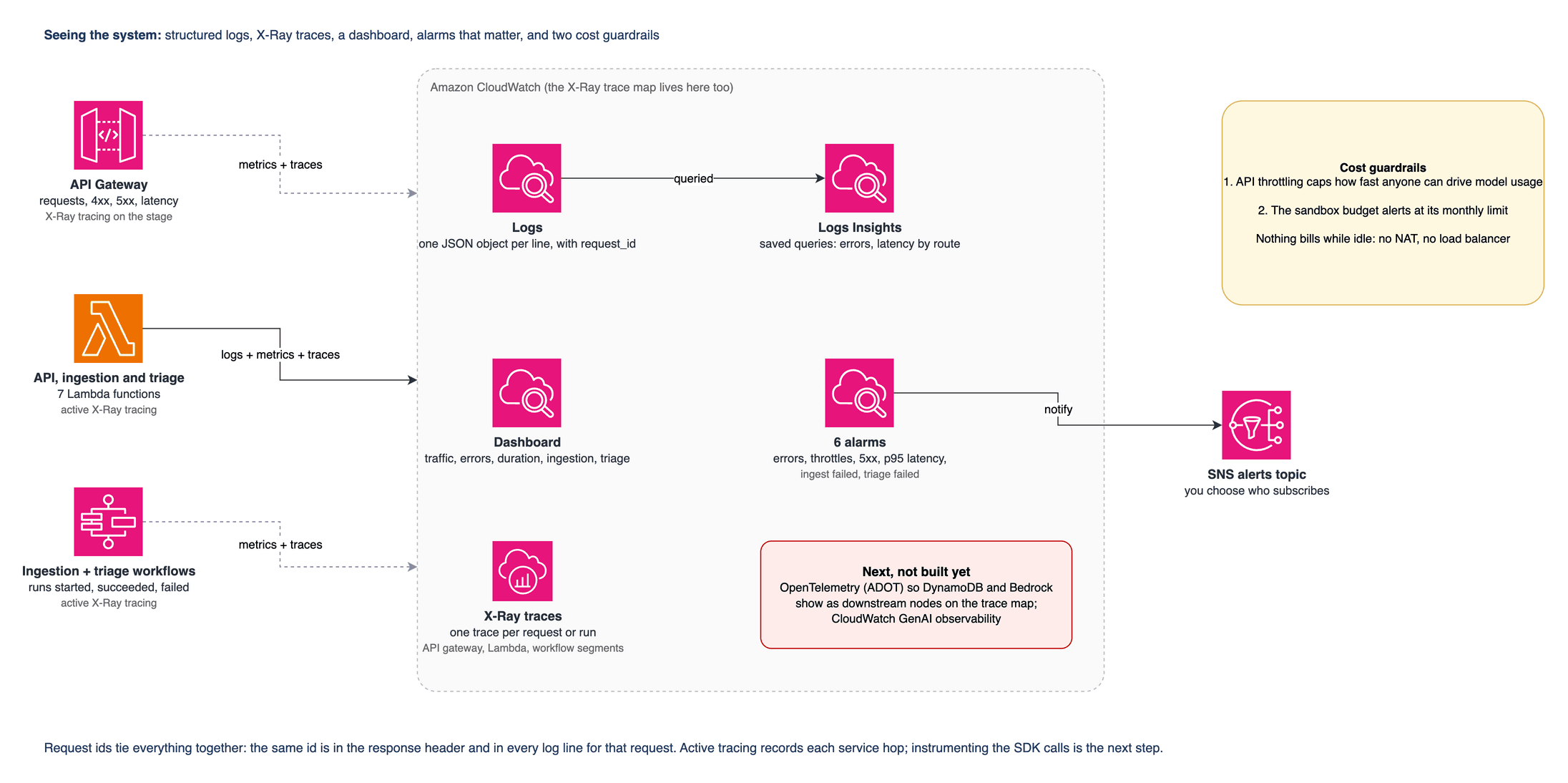
Every request should be traceable, alarms should fire only for things a person would act on, and the measurements themselves should be checked against real data.
- Wrote logs as one JSON object per line, with a request id on every response and every log line, and never logged the text of a message
- Built a CloudWatch dashboard, three saved log queries, and alarms that publish to an SNS topic, which has no subscribers yet
- Limited how fast anyone can drive model usage with API Gateway throttling: 5 requests per second in dev and 10 in prod
- Fixed a latency metric that reported about 2 ms for a streamed reply that took about 2 seconds, by timing the whole stream instead of the first byte
Select the diagram to open it at full size How it was validated
- Confirmed with a live log query: 1.5 ms to the first byte against 1,841 ms for the whole reply
- Added a test that locks in the fix and also checks that message text never appears in the log
- Verified all five alarms healthy on dev; a sixth was added in step 10
Amazon CloudWatch · CloudWatch Logs Insights · Amazon SNS · Python
Step 08: The tour experience
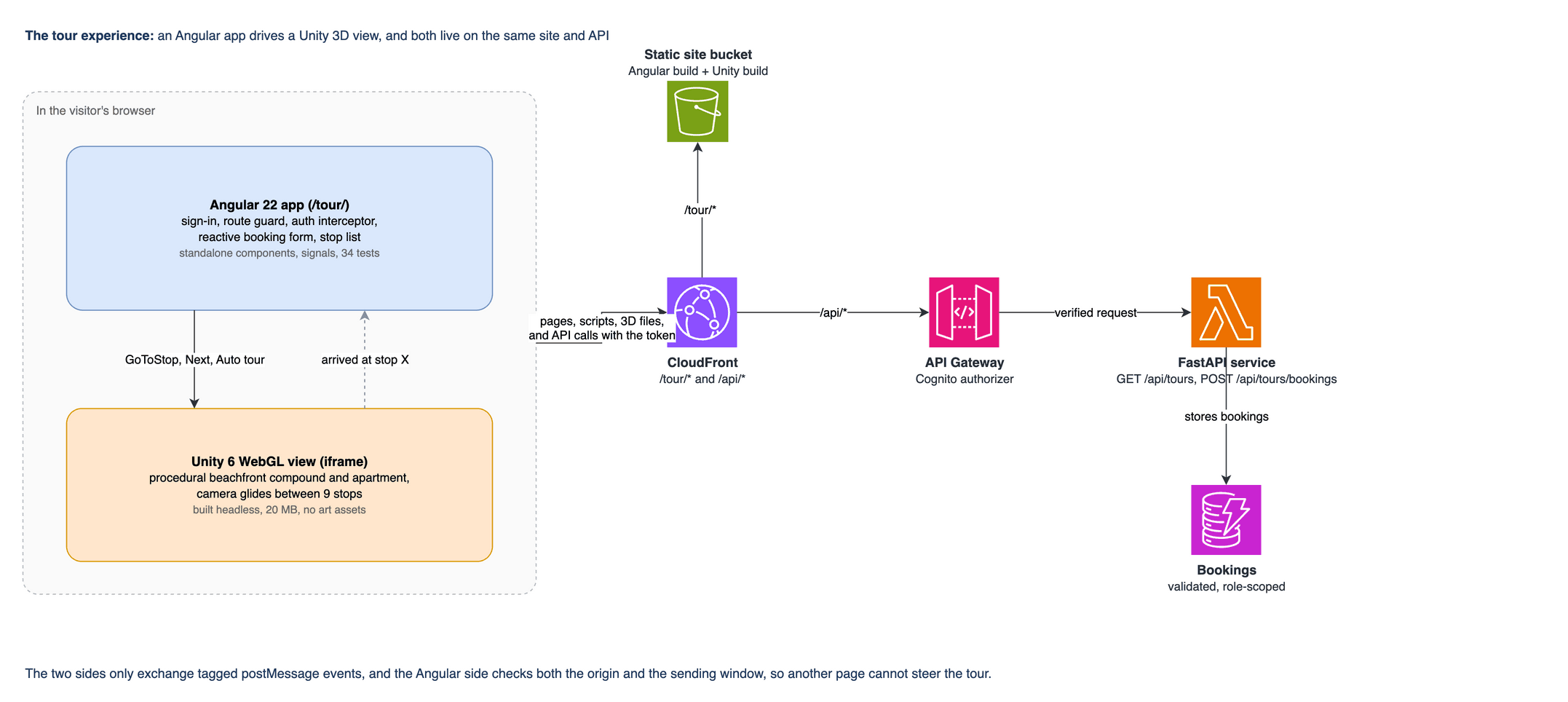
I added a visitor experience on the same platform: an Angular app, a Unity 3D walkthrough and a booking form, all behind the same sign-in and API.
- Built an Angular 22 app with standalone components, signals, a route guard, an auth interceptor and reactive forms
- Generated the Unity WebGL scene entirely in code, with nine tour stops and no art assets, and built it from the command line
- Connected the page and the 3D view with postMessage in both directions, checking the origin and the sending window on every message
- Added a tours catalogue and a bookings API, with validation on the server and listings limited by role
Select the diagram to open it at full size How it was validated
- Tested the Angular app, and removed each of four security rules on purpose to confirm the tests fail without them
- Extended the smoke test to cover deep links, a valid booking that is accepted and an invalid one that is rejected
- Fixed a rendering bug that only showed in a real browser, then added tests that fail if it comes back
Angular · TypeScript · Unity WebGL · FastAPI · Amazon DynamoDB
Running in dev only
Step 09: The work-order triage agent
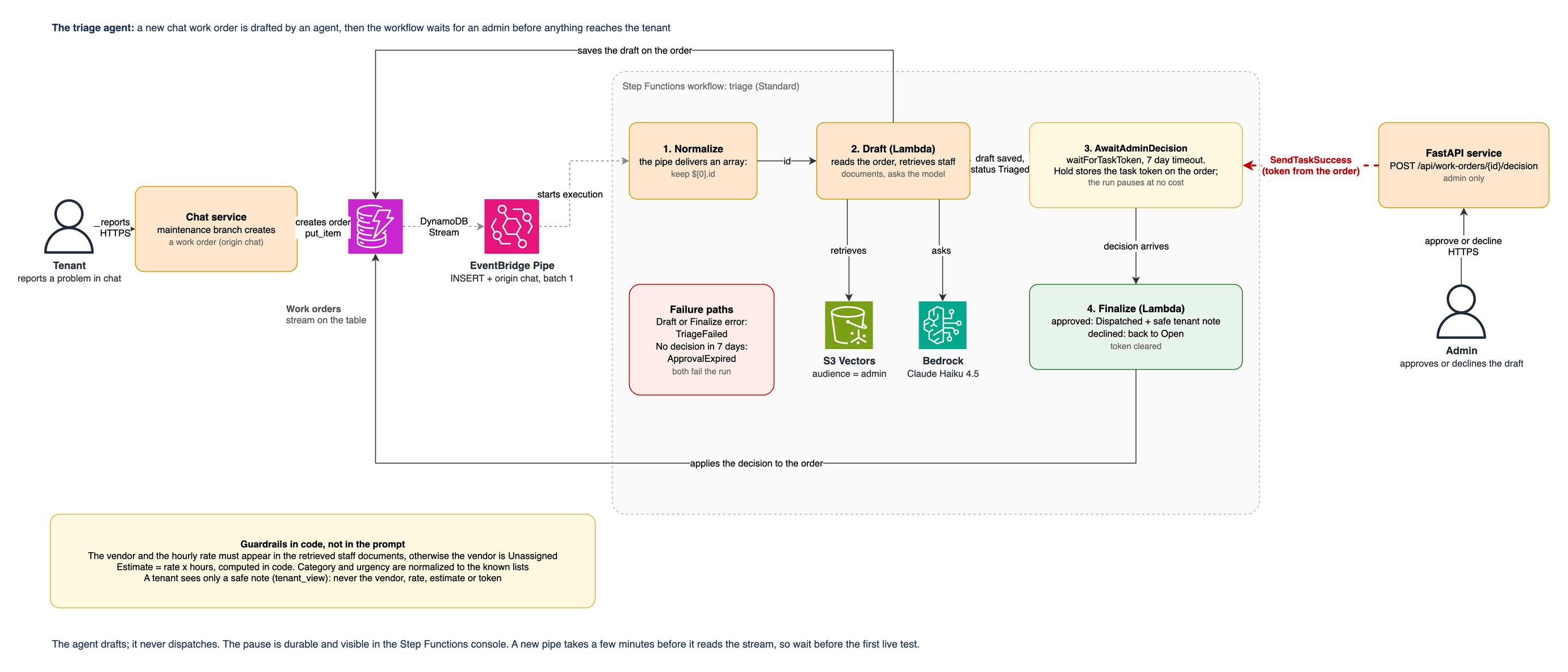
When a new work order arrives, an agent drafts the dispatch for it. Nothing reaches the tenant until an admin approves the draft.
- Connected new work orders to a Step Functions workflow through a DynamoDB Stream and a filtered EventBridge Pipe, with no custom glue code in between
- Paused the workflow for up to 7 days until an admin approves or declines the draft
- Put the guardrails in code, not in the prompt: the vendor and rate must appear in the retrieved staff documents or the draft says Unassigned, and the cost estimate is calculated by code
- Replaced the hardcoded admin maintenance queue with real work orders and approve or decline buttons; the analytics and activity tabs still show sample data
Select the diagram to open it at full size How it was validated
- Tested offline, removing the grounding and tenant-visibility rules on purpose to confirm the tests catch it
- Passed the full smoke test on dev, which now covers the stream, the pipe, the workflow, the admin approval and what the tenant sees
- Fixed the first live run, which failed because the pipe delivers events as a list even when the batch size is 1
AWS Step Functions · Amazon EventBridge Pipes · DynamoDB Streams · Amazon Bedrock · Amazon S3 Vectors · AWS Lambda
Running in dev only
Step 10: Tracing with X-Ray
The earlier monitoring step watched each service on its own. This step follows one request, or one triage run, across all of them. The traces show each hop between services; showing the database and model calls inside a hop needs OpenTelemetry, which is not built yet.
- Turned on X-Ray tracing in Terraform for the API Gateway stage, all 7 Lambda functions and both Step Functions workflows
- Added a sixth alarm for failed triage runs, including approvals that time out after 7 days, and two triage widgets on the dashboard
- Kept run data out of the workflow logs, so message text and vendor rates never reach CloudWatch Logs
How it was validated
- Deployed to dev through the pipeline in the same change as the triage agent, with the smoke test passing
- Documented from the Terraform and the deployed configuration; I did not capture a live trace map
AWS X-Ray · Terraform · Amazon CloudWatch · AWS Step Functions


What the finished system shows
- Replaced a chat backend I did not control with a tested Python service I own, without changing how the chat widget talks to it
- Built role-based access into the search itself, and proved it holds by removing the safeguards in tests and by running live queries
- Delivered one Terraform stack to three environments, with CI/CD that stores no cloud keys and a deploy script that refuses to destroy data
- Added an event-driven agent whose facts are checked in code and whose drafts wait for a person's approval
- Still open: staging and production have not received the last release, and OpenTelemetry instrumentation is not built
Python · FastAPI · LangChain · LangGraph · Amazon Bedrock · Amazon S3 Vectors · AWS Step Functions · AWS Lambda · Amazon DynamoDB · Amazon Cognito · Amazon CloudFront · Terraform · GitHub Actions · Next.js · Angular · Unity